nginx는 http이외의 TCP나 UDP 프록시도 지원하는데 그러려면 http블록 밖의 stream 블록에서 선언해야 한다.
22번 포트에 ssh서버가 있는 상황에서 nginx 설정파일을 다음과 같이 하면
stream{
    server{
            listen 88;
            proxy_pass localhost:22;
        }
}
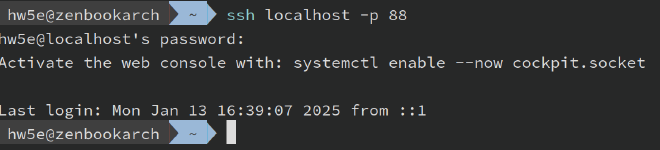
https://docs.nginx.com/nginx/admin-guide/load-balancer/tcp-udp-load-balancer/
내용 추가 (2025-02-05)
stream은 stream 모듈이 있어야 작동하는데 소스를 직접 빌드하는 경우--with-stream 옵션을 붙이면 된다.
레드햇 계열 리눅스에서는 모듈이 없어서 다음 방법으로 모듈을 설치했다. appstream 저장소의 nginx-mod-stream 패키지를 설치하였다.
[~]$ sudo dnf -y install nginx-mod-stream
Last metadata expiration check: 0:18:40 ago on Tue Feb  4 21:08:15 2025.
Dependencies resolved.
========================================================================================================================
 Package                        Architecture         Version                              Repository               Size
========================================================================================================================
Installing:
 nginx-mod-stream               x86_64               2:1.20.1-20.el9.0.1                  appstream                77 k

Transaction Summary
========================================================================================================================
Install  1 Package

Total download size: 77 k
Installed size: 184 k
Downloading Packages:
nginx-mod-stream-1.20.1-20.el9.0.1.x86_64.rpm                                           148 kB/s |  77 kB     00:00
------------------------------------------------------------------------------------------------------------------------
Total                                                                                    81 kB/s |  77 kB     00:00
Running transaction check
Transaction check succeeded.
Running transaction test
Transaction test succeeded.
Running transaction
  Preparing        :                                                                                                1/1
  Installing       : nginx-mod-stream-2:1.20.1-20.el9.0.1.x86_64                                                    1/1
  Running scriptlet: nginx-mod-stream-2:1.20.1-20.el9.0.1.x86_64                                                    1/1
  Verifying        : nginx-mod-stream-2:1.20.1-20.el9.0.1.x86_64                                                    1/1

Installed:
  nginx-mod-stream-2:1.20.1-20.el9.0.1.x86_64

Complete!